10
Oct
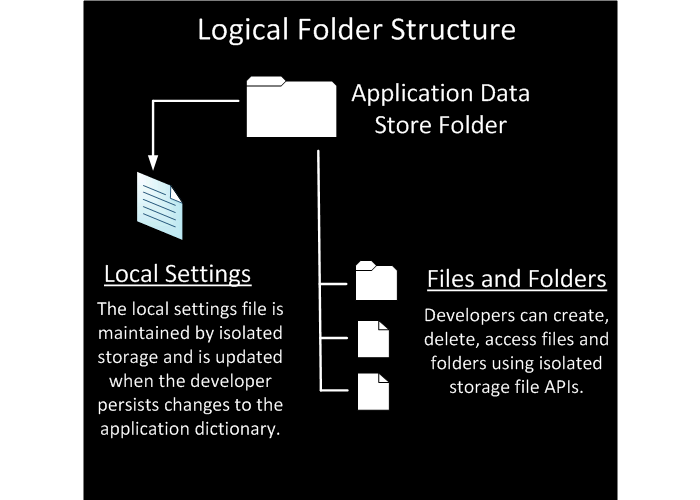
Using Isolated Storage to save/load files on Windows Phone 7
I’m seeing a lot of forum threads with people asking how to save/load files on Windows Phone 7, well for XNA 4 in general.
You can use IsolatedStorage for that
using System.IO.IsolatedStorage;
Both save and load can be done by creating a IsolatedStorageFile, I then use a Filestream and write with a binaryWriter
IsolatedStorageFile store = IsolatedStorageFile.GetUserStoreForApplication(); // grab the storage FileStream stream = store.OpenFile("test.txt", FileMode.Create); // Open a file in Create mode BinaryWriter writer = new BinaryWriter(stream); float myvar = 5.0f; writer.Write("something"); writer.Write(myvar); writer.Close();
For loading is pretty much the same thing:
IsolatedStorageFile store = IsolatedStorageFile.GetUserStoreForApplication(); if (store.FileExists("test.txt")) // Check if file exists { IsolatedStorageFileStream save = new IsolatedStorageFileStream("test.txt", FileMode.Open, store); BinaryReader reader = new BinaryReader(save); string mystring = reader.ReadString(); float myfloat = (float)reader.ReadSingle(); reader.Close(); }
Simple right? I really don’t know if this is the best way but I’ve tested on both the emulator and a real device and it works.

October 17th, 2010 at 14:51
Where exactly does this text go? Unloadcontent for save? Loadcontent for load? I have been trying to implement load and save, but have found it very difficult.
October 17th, 2010 at 14:52
I recommend you make a class out of this. Maybe a static one.
Then whenever you want to save/load just use it’s methods for save or load
October 17th, 2010 at 15:34
So, a class like this one would work? I am very new to programming, so sorry if these questions sound basic.
using System.IO.IsolatedStorage;
using System.IO;
namespace GameStateManagement
{
static class Storage
{
static public void LoadContent()
{
IsolatedStorageFile store = IsolatedStorageFile.GetUserStoreForApplication(); // grab the storage
FileStream stream = store.OpenFile(“test.txt”, FileMode.Create); // Open a file in Create mode
BinaryWriter writer = new BinaryWriter(stream);
float myvar = 5.0f;
writer.Write(“something”);
writer.Write(myvar);
writer.Close();
if (store.FileExists(“test.txt”)) // Check if file exists
{
IsolatedStorageFileStream save = new IsolatedStorageFileStream(“test.txt”, FileMode.Open, store);
BinaryReader reader = new BinaryReader(save);
string mystring = reader.ReadString();
float myfloat = (float)reader.ReadSingle();
reader.Close();
}
}
}
}
October 17th, 2010 at 15:41
Exactly.
Just pass the file as a parameter, like
static public void LoadContent(string file)
{
….
FileStream stream = store.OpenFile(file, FileMode.Create);
…
}
Hope it helps
October 17th, 2010 at 18:49
So, like this:
namespace GameStateManagement
{
static class Storage
{
static public void LoadContent(string file)
{
IsolatedStorageFile store = IsolatedStorageFile.GetUserStoreForApplication(); // grab the storage
FileStream stream = store.OpenFile(“file”, FileMode.Create); // Open a file in Create mode
BinaryWriter writer = new BinaryWriter(stream);
float myvar = 5.0f;
writer.Write(“doodle”);
writer.Write(myvar);
writer.Close();
if (store.FileExists(“file”)) // Check if file exists
{
IsolatedStorageFileStream save = new IsolatedStorageFileStream(“file”, FileMode.Open, store);
BinaryReader reader = new BinaryReader(save);
string mystring = reader.ReadString();
float myfloat = (float)reader.ReadSingle();
reader.Close();
}
}
}
}
If so, thanks.
My last question is how do I allow a button in another class to be touched to load the saved file?
December 15th, 2010 at 7:18
AWESOME!!! I’m also fairly new to programming and this was a snap! Well, it works in the emulator.
January 30th, 2011 at 15:23
For iphone there are apps that help load and save files on the phone. What about WP7? Do they intend to create similar programs-software?
January 30th, 2011 at 15:39
I honestly have no idea if they intend to do so. WP7 developer tools are still very new and we still don’t have as we can get on iPhone by using iPhone SDK
March 9th, 2011 at 0:07
Thanks for this description.
Now this application run right,but when I close the emulator and start new run (F5)
the data was not found.
If it is happen because I use emulator,and when I use the device on my hand the application will work right?
Thanks.
March 9th, 2011 at 14:33
The emulator deletes all states once it’s closed. But that code works fine on a real device even if it’s turned off.
March 9th, 2011 at 17:17
I have a question and I do not know if you can assist me or not,
Now,I can access web server such as Currency converter “http://www.webservicex.net/CurrencyConvertor.asmx?WSDL” using its xml code,but if I want use website not web server
how can I access it? I mean any web site such as facebook ,goal.com ,maps.google
Thanks.
April 8th, 2011 at 20:00
I have a question. Is it possible to load/save file using user interface? I mean, on button’s click open some window where files are located.
April 8th, 2011 at 20:12
No. Not on WP7 at least. You don’t have root access to files. You can however make a custom interface showing your saved files. But that’s about it
April 8th, 2011 at 21:20
Thank You.
May 19th, 2011 at 4:14
Hi, Where exactly does it save this file on the phone?
May 19th, 2011 at 9:05
Probably inside the same folder as the game is installed. You can’t directly access it if that’s what you are asking. There’s no direct file manipulation on WP7
June 1st, 2011 at 11:57
Hi, how to save an image example .bmp image from stream ? I try to read an .bmp image file with StreamResourceInfo like this :
StreamResourceInfo sri = null;
Uri Uri = new Uri(“Images/lena.bmp”, UriKind.Relative);
sri = Application.GetResourceStream(Uri);
i make a change with some byte in stream and write in to other stream (out stream).
How to make a new image from out stream, please?
August 30th, 2011 at 19:26
Thanks so much… you solve all my problems
November 12th, 2011 at 14:42
Don’t forget to Dispose all the IDisposable objects properly! The preferable way would be to wrap it all in using-blocks: