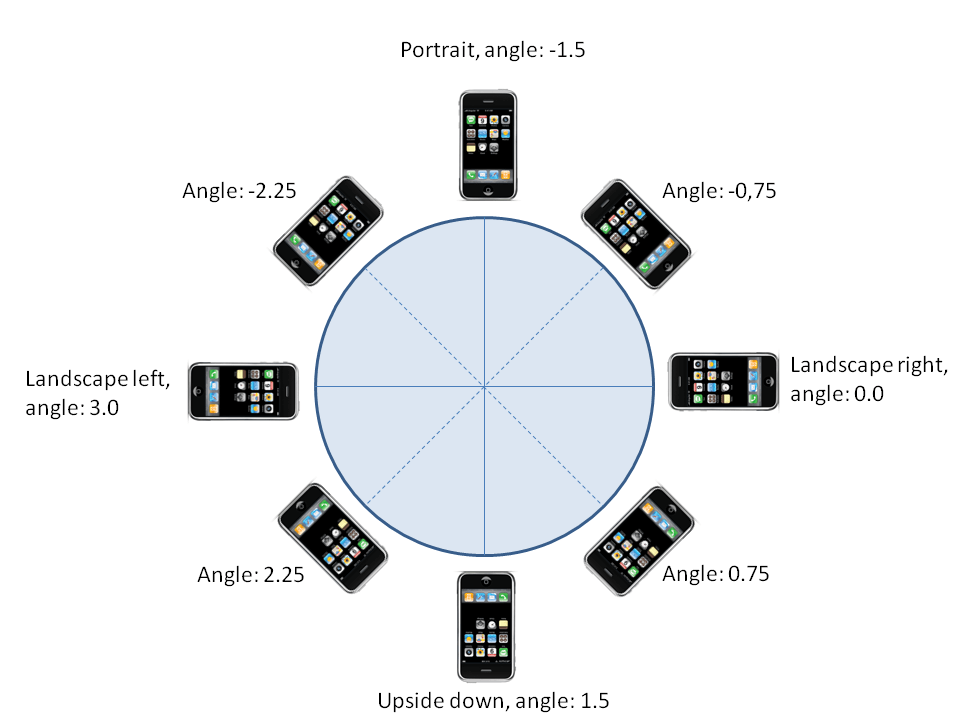
Even tough it’s not mandatory to support all screen orientations it’s always nice to support at least 2 of them.
Let’s imagine your game is landscaped, by some reason the user may want to use either with the home button on the left or on the right. Most games support this, if you flip the device, the game will too.
I’ve been using OpenGL to support the device orientation, most people on forums want an automatic solution, but belive me, it’s best that you have control on this.
So for Landscape with Home button on the right

It’s something like:
 glPushMatrix();   // Push a matrix to the stack
 glRotatef(90.0f, 0.0f, 0.0f, 1.0f); // Rotate 90 degrees
 glTranslatef(0.0f, -320, 0.0f);  // Move vertically the screen Width

 /// Draw Stuff

 glPopMatrix();
So basically we are drawing all in a regular direction but rotating everything 90 degrees and translating to fit the screen properly.
For the home button on the left

glPushMatrix();
glRotatef(-90.0f, 0.0f, 0.0f, 1.0f);
glTranslatef(-480, 0.0f, 0.0f); // Move horizontally the screen Height

// Draw Stuff

glPopMatrix();
These are the tricky ones, you can figure out the Portrait Upside down =)
Oh, I’ve hard-coded the values (480 and 320) but you should make this a variable to support higher resolutions, iPhone 4 and iPad for instance.
Although you could use iOS api to auto rotate this automatically I’ve read on numerous places that it’s slows down everything a bit and doing this on OpenGL is pretty quick and clean and if you ever port your game to another device (Android, etc) you don’t have to care about this again.
So now for the tricky part, to detect the device current orientation, the accelerometer can help out pretty good. We can check for the current angle to calculate where the device is pointing.
- (void)accelerometer:(UIAccelerometer *)accelerometer didAccelerate:(UIAcceleration *)acceleration
 {
	// Get the current device angle
	float x = [acceleration x];
	float y = [acceleration y];
	float angle = atan2(y, x);

        if(angle >= -2.25 && angle <= -0.25)
	{
	/// Orientation is regular Portrait
	}
	else if(angle >= -1.75 && angle <= 0.75)
	{
	/// Orientation is Landscape with Home Button on the Left
	}
	else if(angle >= 0.75 && angle <= 2.25)
	{
	/// Orientation is Portrait flipped upside down
	}
	else if(angle <= -2.25 || angle >= 2.25)
	{
	/// Orientation is Landscape with Home Button on the Right
	}
}
So what you should do is keep a variable that stores the current Orientation so when you draw you know exactly what rotation to apply to the matrix.
I’ve tested this code on a real device with pretty good results. Also it won’t slow down everything and if you think it does just check screen orientation at greater intervals.
Some cool things you can do it when switching to iterate the rotation angle, that way you can simulate the screen rotation same way iOS does. Also you may want to put some sort of delay when switching.
Here’s the result